Continue reading →
Showing posts with label Blogger Hacks. Show all posts
Showing posts with label Blogger Hacks. Show all posts


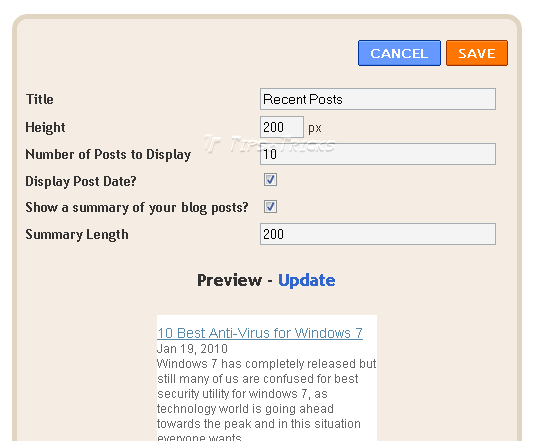
Recent Posts Widget for Blogger with Thumbnails, Summaries, Comments, etc

Display beautifully crafted links to Recent Posts on your
blog with this widget. You can easily customize
whether or not you would like to display thumbnails,
post summaries, and the number of comments for each
post along side the titles.
Features and Customization:
The Recent Post Titles
Display Post Thumbnails
Choose which blog posts to display (choose URL).
Display Post Summaries
Length of Summaries
Display Post Date
Display Number of Comments on each post
Display Read More Link
Display separator between posts
Number of Posts do Display
Determine height
PREVIEW:

Install the Recent Post Widget on Your Blog:
This widget is very simple to install. Just simply click the button below to choose which blog you
.jpg)
Many thanks to Blogger Plugins!
Add Digg Vote Button Counter Widget to Blogger

This tutorial explains how to integrate a Digg
Button into your blogger template, which will be
displayed in each of your blogger posts. The
button displays the amount of times each post
has been dugg and lets users digg directly from
your blog.

Here are the Steps:
1. Make sure to Backup your Template!
2. Open your blogger template, click Expand Widget Templates, and search for the code below:
3. Add this code below directly above the searched code above:
4. Now Preview and Save your Template!
Add Google Buzz it Button to Blogger
 Google Buzz is a great social tool which is very similiar to Twitter and Facebook. It's a wonderful way to engage and interact with your readers! Make sure to implement these Google Buzz buttons into your blogger posts, so that users can easily share your content on Google Buzz.
Add Google Buzz it Button to Blogger
1. Go to Layout >Edit HTML in your Blogger Dashboard.
2. Back up your existing Template before making any changes!
3. Make sure to check the "Expand Widget Templates" box.
4. Here is the Google Buzz it Code:
5. Search for this line of code in your template:
and place the Google Buzz it Code right after the code you searched for above.
If this doesn't work, then search for this code below and place the Google Buzz it Code directly before it.
6. Now save your template and you're done!
Blogger Search Bar Form
Add a search engine in the sidebar of your blogger blog. This searches all the posts on your blog, and displays them by latest posts first. Inside the search bar you will find the text "Search this Site", this can easily be changed to any text you desire. Such as "Search my Site", "Search", "Type and Hit Enter", etc. Just simply replace the code. You can also change the text "Go" on the button to something like "Search", "Find", etc.
Subscribe to:
Posts (Atom)


